
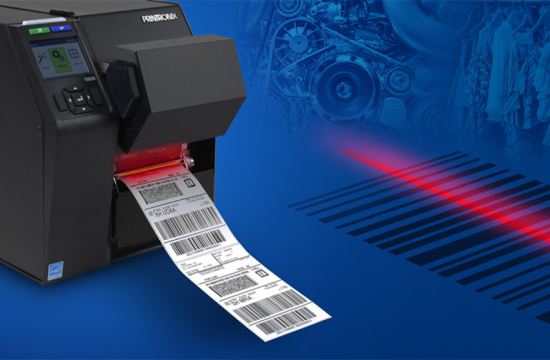
Imagine this: your warehouse is buzzing with activity. Orders are flying in, and your team is picking and packing at record speed. But then, everything grinds to a halt. Why? A smudged shipping label that the courier’s scanner can’t read, or a standard office printer that just jammed for the third time today.
In the world of logistics and inventory management, efficiency isn’t just a buzzword it’s the difference between a satisfied customer and a lost contract. While it might be tempting to rely on standard office equipment for your labeling needs, specialized hardware is the unsung hero of a smooth operation.
If you are looking for dependable label and barcode printers that streamline your shipping and inventory workflows, it’s time to look beyond the standard inkjet. Investing in a dedicated machine means investing in speed, precision, and long-term reliability. Whether you are a small startup shipping from a garage or a large-scale industrial operation, having the right tools makes all the difference.
You can browse our full range of Shipping Label and Barcode Printers to find the perfect fit for your setup. From compact desktop models to industrial workhorses, we stock trusted brands that deliver consistent performance day in and day out.
Why Choose Professional Label and Barcode Printers?
You might be wondering if a specialized printer is truly necessary. Can’t a standard laser printer handle a few shipping labels? While feasible for very low volumes, standard office printers quickly become a bottleneck as your business grows. For more tips on choosing the right printer for your needs, check out our guide on things to consider when buying a printer or photocopier.
Professional barcode label printers offer significant advantages designed specifically for the rigors of supply chain management. These specialized devices are built for durability and consistent performance in demanding environments. Unlike a paper sheet that might get wet and tear, professional labels are often designed to withstand friction, moisture, and temperature changes.
Most importantly, these printers produce crisp barcodes and clear text that stay scannable even in tough conditions. A barcode that fails to scan at a distribution center can result in returned shipments, lost inventory, and hefty chargebacks.
Unlike standard inkjet or laser options, label and barcode printers rely on thermal printing technology. This ensures smudge-free, cost-efficient performance without the need for expensive ink cartridges that run out at the worst possible moment.
Understanding Thermal Printing Technology
When you dive into the world of professional labeling, you will encounter two main types of technology: thermal direct and thermal transfer. Understanding the difference is key to choosing the right machine for your specific application.
Thermal Direct Printing
Thermal direct printers apply heat directly to a specially coated, heat-sensitive label material. The heat causes the label to turn black, creating the image or text.
The Pros:
- Cost-Effective: You don’t need to buy ribbons, ink, or toner. The only consumable is the label itself.
- Simplicity: With fewer moving parts and no ribbon to load, these printers are easy to operate and maintain.
The Cons:
- Sensitivity: Because the paper is heat-sensitive, it can fade over time, especially if exposed to sunlight or heat.
Best Use Cases:
Thermal direct is an excellent choice for creating temporary labels. This makes it the industry standard for shipping labels, fresh food labels, and receipts—items that only need to remain readable for a short period (usually days or weeks).
Thermal Transfer Printing
Thermal transfer printers use a heated printhead to melt a wax or resin ribbon onto the label surface. This bonds the ink to the material permanently.
The Pros:
- Durability: This method produces long-lasting, high-quality images. The print is resistant to smudging, fading, chemicals, and environmental factors.
- Versatility: You can print on a wider variety of materials, including synthetics like polyester or polypropylene.
The Cons:
- Cost: You need to purchase both labels and ribbons.
Best Use Cases:
Thermal transfer is ideal for asset tracking, product identification, outdoor labeling, and inventory that sits in storage for months or years. If your label needs to survive a year on a warehouse shelf or exposure to rain, this is the technology you need.
Explore Our Sato Barcode Label Printers
At Gleesons, we stock Sato printers, a brand renowned for its reliability and precision in industrial environments. Sato has built a reputation for engineering devices that can handle the dusty, high-volume reality of warehouse work without skipping a beat.
Here is a look at some of the standout models in our current selection:
Sato WS4 Thermal Direct Printer
This desktop model provides excellent value for businesses that require high-quality direct thermal printing without a massive footprint. It is designed to be intuitive and easy to use, meaning your staff can start printing labels with minimal training.
Perfect for: Shipping labels, visitor badges, and basic barcode applications. It delivers consistent results at an accessible price point, making it a favorite for e-commerce businesses.
Sato WS4 Thermal Transfer Printer
Sharing the same compact form factor as its direct thermal cousin, this model adds the versatility of ribbon printing. It gives you the flexibility to print durable asset tags one day and shipping labels the next (if you switch media).
Perfect for: Operations that require durability and versatility. It supports a wide range of label materials and ribbon types, making it a great “all-rounder” for small to medium businesses.
Sato CL4NX-Plus Thermal Printer
When your operation demands heavy lifting, the CL4NX-Plus is the answer. This is an industrial-grade machine designed for high-volume, continuous printing. It features advanced connectivity options, exceptional print quality, and robust construction that protects the internal mechanisms from industrial wear and tear.
Perfect for: High-volume manufacturing, distribution centers, and environments where downtime is not an option.
Professional Results, Every Time
Consistency is the hallmark of a professional operation. With our range of printers, you can trust that your labels will always look professional. This reflects well on your brand when a customer receives a package, and it ensures seamless tracking through the logistics network. Learn how custom labels can help boost your sales and elevate your brand presence.
Furthermore, these machines are designed for maintenance. If performance drops due to wear after printing hundreds of thousands of labels, the printhead can be replaced quickly and easily. This modularity extends the life of your investment significantly compared to consumer-grade electronics.
Discover the power of our shipping label and barcode printers, engineered to handle high-demand environments with clarity, speed, and consistency.
Frequently Asked Questions
Can I use a thermal printer for color printing?
Generally, no. Most standard thermal printers are monochrome, printing only in black. While some specialized ribbons allow for a single color (like red or blue), thermal printing is designed for high-contrast barcodes and text, not graphics or colorful logos.
Do I need special software to use these printers?
Most professional label printers come with drivers that work with standard operating systems like Windows. However, to maximize efficiency, many businesses use dedicated labeling software (like NiceLabel) or print directly from their shipping platforms (like Starshipit or Shippit) which integrate seamlessly with these printers.
How often do I need to clean my barcode printer?
Regular maintenance is vital for longevity. It is generally recommended to clean the printhead every time you change the ribbon (for thermal transfer) or every time you change the label roll (for thermal direct). This prevents adhesive and dust buildup which can cause “dead spots” in your printing.
Streamline Your Workflow Today
Upgrading your labeling hardware is one of the highest ROI changes you can make in your warehouse. It reduces errors, speeds up packing times, and ensures your packages look professional every single time.
Don’t let poor equipment hold your business back. Whether you need the simple efficiency of the Sato WS4 Direct or the industrial power of the CL4NX-Plus, we have the right solution for you.
Browse our collection today to find the printer that matches your volume and budget, and take the first step toward a smoother, more efficient fulfillment process.