

Digital freight tools simplify LTL quote comparison by capturing your shipment details once, sending the same request to several carriers, and returning the answers in matching fields such as estimated total, transit estimate, included services and carrier rating. That reduces the effort of comparing differently formatted emailed quotes. The comparison is still only as good as the weights, dimensions and delivery details you enter, so accurate inputs remain your job.
Ask three carriers for a less-than-truckload (LTL) rate by email and you will often get three answers that cannot be lined up against each other. One shows a base rate with fuel listed separately. Another quotes a single figure but assumes the receiver has a loading dock. A third arrives a day later with a transit estimate in business days and a note that the price is subject to the carrier’s tariff. Each reply is reasonable on its own. Side by side, they are hard to compare.
Digital freight tools are built to fix that structural problem. This guide explains what they do with your shipment data, which quote fields matter most, and where your own checks take over.
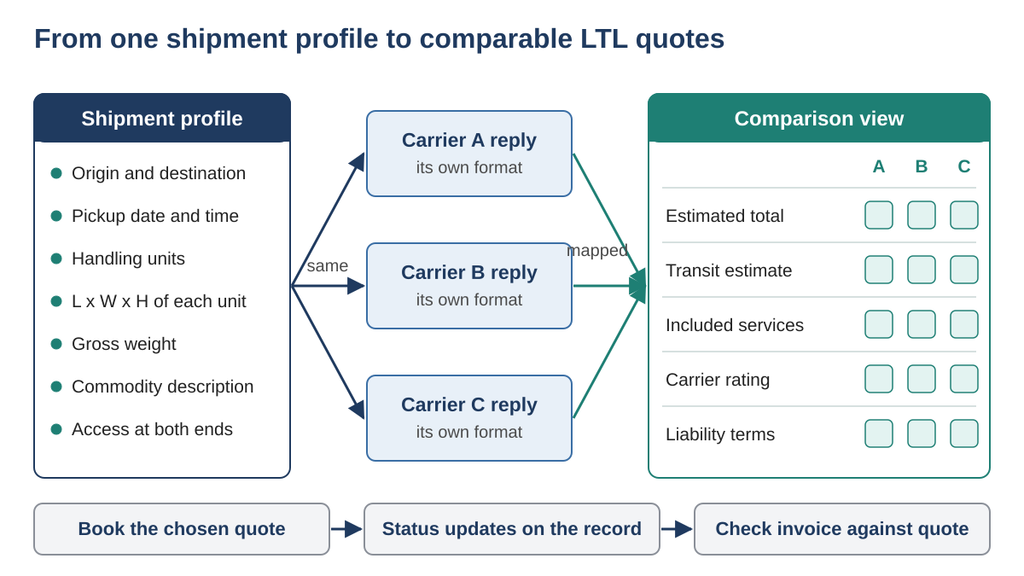
How a digital freight tool turns one shipment profile into quotes that can be compared field by field.
Why Are LTL Quotes Hard to Compare by Hand?
An LTL price is assembled from several parts. Canadian carriers rate a shipment on its weight and the space it occupies under their own published tariffs and contract terms. Fuel surcharges and additional services may be included or added separately. Check each carrier’s current fuel table, calculation basis and service definitions. Those extras, called accessorials, include tailgate (liftgate) service, residential or limited-access delivery, delivery appointments and waiting time.
When quotes arrive by email, each carrier decides which of those parts to show and which to assume. The same 600-pound skid can look cheap in one reply only because the delivery appointment the receiver requires was never priced. Comparing headline numbers in that situation is not really comparing.
What Does a Digital Freight Tool Actually Do?
A structured quote workflow can follow these four steps, although individual platforms offer different functions.
It turns your shipment into a structured profile
Instead of a free-text email, you fill in defined fields: origin and destination postal codes, pickup date, number of handling units, length, width and height of each unit, gross weight, a commodity description, and the services needed at each end. Required fields reduce omissions, but the shipper still needs to review handling, site access and any details the form does not ask about.
It sends one identical request to several carriers
Sending the same profile reduces differences caused by inconsistent requests. Still compare each response’s assumptions: carriers may interpret access, service scope or rating rules differently even when they receive identical information.
It normalizes the replies
Responses are mapped into the same columns, so you see each carrier’s estimated total, transit estimate and included services next to each other instead of decoding several formats.
It keeps the booking attached to the quote
When you book, the accepted quote, the shipment details and later status updates stay in one record. That record is what you check the invoice against when it arrives.
Which Quote Fields Matter Most?
Not every column deserves equal weight. The table below lists the fields worth checking on every comparison and what to look for in each one.
| Field | Why it matters | What to check |
|---|---|---|
| Estimated total | The figure most people compare first | Whether fuel and every requested service are included |
| Fuel surcharge | Moves with a published diesel index, often weekly | That the percentage applies to your ship date |
| Accessorials | Tailgate, appointment and access fees add up quickly | That every service the receiver needs is listed |
| Transit estimate | Drives planning at the receiving end | Whether it is a standard estimate or a paid guaranteed service |
| Liability terms | Sets what the carrier pays if goods are lost or damaged | Default limit, declared value option and any valuation charge |
| Quote assumptions | Explains what the price is based on | Dimensions, weight, density minimums and validity date |
Where Does Software Stop and Your Judgment Start?
A comparison tool organizes information, but it cannot see your freight, and several parts of LTL pricing depend on what the carrier finds.
Inputs still decide the price
Carriers may inspect, reweigh or re-measure freight under their contract terms. Use gross weight, including the pallet and packaging. If an invoice changes after inspection, ask for the measurement record and the tariff or contract provision used; review and dispute mistakes through the carrier’s process.
Carrier rules differ in ways a tool cannot hide
A carrier may apply a minimum billable density rather than charge on actual weight alone. The following example uses assumed minimums solely to explain the calculation; they are not current quotes or verified rates from any named carrier.
Illustrative example (hypothetical shipment, not real rates): a 48 by 40 by 60 inch pallet occupies 115,200 cubic inches, or about 66.7 cubic feet (115,200 divided by 1,728). Under a 10-pound minimum it would be rated at no less than about 667 pounds. Under a 14-pound minimum, about 933 pounds. If the pallet actually weighs 500 pounds and the assumed rule applies, the higher calculated figure becomes the example’s billable weight. A good tool shows both quotes clearly; understanding why they differ is still your call.
Transit estimates are not guarantees
Transit days shown in a comparison are usually estimates. Ask what the booking actually commits to. A delivery appointment reserves a receiving window; it is not automatically a delivery guarantee. If a date cannot move, confirm any time-definite service, its conditions and remedy in writing.
Classification rules depend on the lane
The National Motor Freight Classification (NMFC) is maintained by the National Motor Freight Traffic Association. A carrier may request NMFC details for US or cross-border service. For a domestic Canadian lane, confirm the applicable classification, density and space rules directly rather than assuming a US freight class determines the quote.
How Do You Run a Fair Comparison?
1. Measure the loaded unit at its longest, widest and tallest points, including the pallet.
2. Weigh it with the pallet, wrap and packaging, and record the gross weight.
3. Answer the access questions accurately: dock or no dock, business or residence, appointment or open receiving hours.
4. Compare estimated totals rather than base rates.
5. Read the transit estimate as a plan, not a promise, and add a buffer when the receiving date is fixed.
6. Check liability terms and decide whether declared value or separate cargo insurance makes sense for the goods.
7. Save the accepted quote so the invoice can be checked against it.
Where Does Truxweb Fit?
For businesses that ship LTL mainly within Quebec and Ontario, Truxweb applies this model as a quote comparison and booking platform. Shippers request rates from several carriers at once, compare price, transit estimates and carrier ratings side by side, book, and then receive status alerts and message the carrier’s dispatch team in the same place. As with any platform, confirm that your lane and the services you need are offered for each shipment rather than assuming coverage.
Conclusion
Digital freight tools make LTL quote comparison simpler by enforcing structure: one profile, one identical request, and answers in matching fields. What they cannot remove is the dependence on accurate inputs, carrier-specific rules and the gap between an estimate and a guarantee. Use the tool to line up the options, then apply your own checks before you book.
Frequently Asked Questions
Is an online LTL quote the final price?
Not necessarily. It reflects the details you entered and the carrier’s rules. Reweighs, re-measurements or services added at pickup or delivery can change the invoice.
Why do two carriers quote the same pallet so differently?
Their tariffs differ, including density minimums, fuel tables, accessorial fees and coverage on your lane. A structured comparison makes those differences visible.
Does a quote comparison tool need my freight class?
For domestic Canadian shipments, carriers commonly rate on weight and dimensions under their own tariffs. On US or cross-border lanes, a carrier may ask for NMFC details, so confirm what each carrier requires.
Can I rely on the transit times shown?
Treat them as estimates. If delivery timing is critical, ask whether a guaranteed service exists on that lane, and plan a buffer either way.