
Ask an online rent payment platform five things: who regulates it, how it protects card and bank details, what it does with your personal information, how you control your account, and what happens when something goes wrong. Then check what you can for yourself. Registrations sit in public registries, privacy practices sit in the policy, and account protections show up in the settings. A claim you cannot check is a reason to ask again, not a reason to relax.
Paying rent through an app means handing a company some of your most sensitive details: a bank account or card, often a copy of government ID for identity checks, and information from your lease. Platforms may describe themselves as secure or display badges and compliance language. Those statements are a starting point. The useful work is separating claims you can confirm yourself from claims you have to take on trust, then asking sharper questions about the second group.
This guide is for renters in Canada. It is general information, not legal or financial advice, and rules change, so check the linked sources.
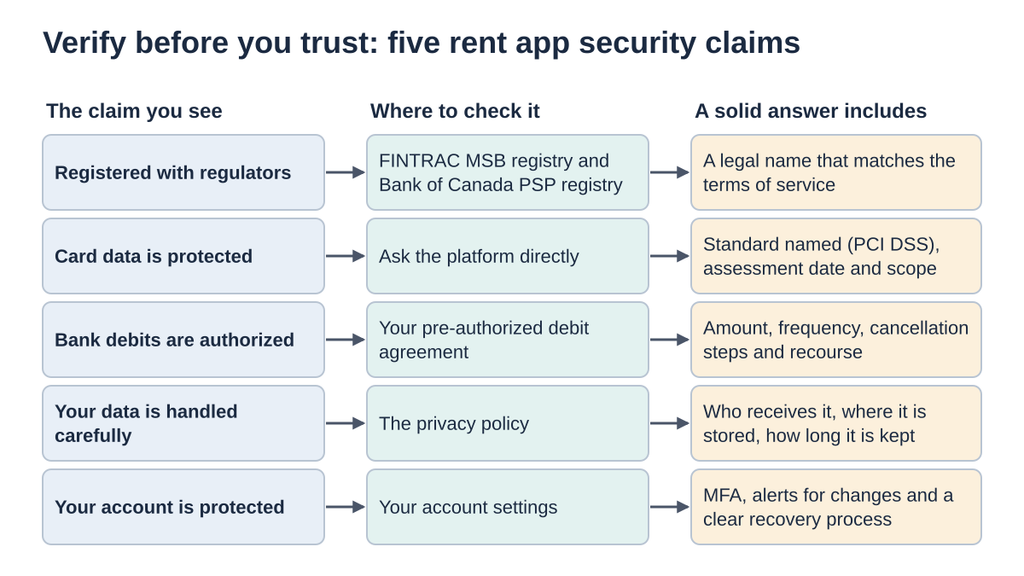
Five security claims a rent payment app may make, and where a renter can check each one.
Why Verification Beats Badges
A badge shows what a company wants you to notice, not the scope, the date or who did the checking. Canada’s federal private-sector privacy law treats banking information and credit or debit card data as personal information, according to the Office of the Privacy Commissioner of Canada (OPC). A rent platform handles exactly the kind of data that law was written to protect, which is reason enough to ask for specifics.
Question 1: Who Regulates the Platform?
Two federal registries are worth knowing. FINTRAC keeps a public Money Services Business Registry, and businesses whose activities fall within its MSB registration requirements must register before operating. The Bank of Canada keeps a registry of payment service providers for businesses subject to the Retail Payment Activities Act.
Two cautions apply. First, a listing is not a seal of approval. FINTRAC states that registration does not mean it endorses or licenses a business, and the Bank of Canada says it does not endorse or license the providers on its registry either. Second, search for the legal name, not the brand name. Find the company’s legal name in its terms of service, then look that up. If you cannot find a listing, ask the platform which registrations apply to it and why.
Question 2: How Are Card and Bank Details Protected?
For card payments, the reference point is PCI DSS, which the PCI Security Standards Council describes as a baseline of technical and operational requirements for protecting payment account data. It applies to organizations that store, process or transmit cardholder data. A fair follow-up question is when the platform was last assessed and what the assessment covered, because a statement with no date or scope is hard to judge.
For bank payments, many platforms use pre-authorized debit (PAD). Payments Canada’s consumer guide lists what a PAD agreement must contain, including your authorization, whether the amount is fixed or varies, how often withdrawals happen, how to cancel and your recourse rights. If a sign-up flow rushes past those details, read the agreement before accepting.
Question 3: What Happens to Your Personal Information?
The privacy policy answers more security questions than most people expect. Look for four things:
- What is collected. Identity checks may involve a copy of government ID and your date of birth. Ask whether all of it is needed.
- Who receives it. Policies often name categories such as payment processors, identity verification providers, analytics tools and credit bureaus.
- Where it may be processed. The OPC’s guidelines on processing personal data across borders say organizations should make it plain when information may be processed in another country, where courts and authorities there may be able to access it.
- How long it is kept. Under PIPEDA’s principle on limiting use, disclosure and retention, organizations should keep personal information only as long as it is needed for the purposes they identified.
Quebec, British Columbia and Alberta have their own private-sector privacy laws, so the details can differ depending on where you live.
Question 4: How Do You Control Your Account?
Much of your protection depends on settings you control. The Canadian Centre for Cyber Security explains that multi-factor authentication (MFA) requires two or more different factors to sign in, and it strongly recommends phishing-resistant options where they exist. Check whether the platform offers MFA, whether you can require it at every sign-in, and how account recovery works if you lose your phone.
Also look for alerts when your password, payment method or contact details change, and for a clear way to switch off optional features yourself.
Question 5: What Happens When Something Goes Wrong?
Ask how the platform tells you about a failed payment, how quickly you can reach a person and how disputes work. Two official rules help you judge the answers.
For data incidents, organizations covered by PIPEDA must report breaches that pose a real risk of significant harm to the OPC, notify the affected people and keep records of all breaches, according to the OPC’s guidance on mandatory breach reporting.
For bank debits, Payments Canada says you have 90 days from the withdrawal to report an incorrect or unauthorized personal PAD to your financial institution. Stopping a PAD changes how you pay, not whether you owe the rent, so set up another way to pay before you cancel one.
A Quick Verification Table
| Claim you see | Where to check | What a solid answer includes |
|---|---|---|
| Registered with regulators | FINTRAC and Bank of Canada registries | A legal name that matches the terms of service |
| Card data is protected | Ask the platform | The standard named, the assessment date and its scope |
| Bank debits are authorized | Your PAD agreement | Amount, frequency, cancellation steps and recourse |
| Your data is handled carefully | Privacy policy | Sharing, storage location, retention and your access rights |
| Your account is protected | Account settings | MFA, change alerts and a clear recovery process |
Applying the Checklist to a Real Platform
Run any platform you are considering through the same steps. TenantPay, for example, is a Canadian rent payment service whose site describes paying rent by pre-authorized debit or card, a loyalty program for renters, and optional credit reporting to Equifax that renters switch on and can turn off. Like any provider, it publishes a privacy policy and terms of service, and those are the right places to begin: compare the legal name in the terms with the public registries, read how data is shared and stored, and confirm the current fees and conditions before your first payment.
Conclusion
Security claims are easy to publish and harder to prove, so treat each one as a question. Check registrations against the public lists, read the privacy policy for sharing and storage, ask for the date and scope behind any standard, and turn on every account protection on offer. Keep copies of your PAD agreement and the terms you accepted. If an answer stays vague after you have asked twice, that tells you something too.
Frequently Asked Questions
Does FINTRAC registration mean a rent platform is safe?
No. FINTRAC says registration shows only that a business met the legal requirements to register. It is not an endorsement or a licence.
What is PCI DSS?
It is the card industry’s security standard for organizations that store, process or transmit cardholder data. Ask when a platform was last assessed and what the assessment covered.
Is a text-message code enough protection?
It is far better than a password alone. The Cyber Centre favours phishing-resistant MFA where it is available, so choose the strongest option the platform offers.
Can I get money back from a wrong pre-authorized debit?
Usually you can make a claim. For personal PADs, Payments Canada says you have 90 days from the withdrawal to report an incorrect or unauthorized debit to your financial institution.
What should I do if my rent platform reports a data breach?
Read the notice carefully, change your password, turn on MFA, watch your bank and card statements, and call your bank about anything you do not recognize.