
Key Takeaways
- Adaptive and responsive design is now a baseline requirement for new mobile apps.
- Designing for thumb-friendly navigation boosts usability, especially on larger screens and foldables.
- Privacy-focused features are highly sought after amid growing awareness of data protection.
- Material 3 Expressive offers users a more tailored and engaging mobile experience than ever before.
In the rapidly evolving world of mobile technology, staying on top of the latest design patterns is essential for delivering intuitive and engaging user experiences. As development practices and consumer expectations shift in 2026, both designers and product owners must adapt. The landscape of app UI design is now driven by flexibility, usability, privacy, and personalized engagement. Understanding these latest trends will help you keep your applications relevant, modern, and user-focused.
Today’s mobile interface is not just about aesthetics. It is a practical framework that must perform well across a spectrum of devices and hands-on scenarios. Modern users expect applications to seamlessly accommodate their routines, contexts, and privacy preferences. With these requirements, designers are under pressure to incorporate the most effective design principles and patterns into their workflows.
Adaptive and Responsive Design
One of the most notable shifts is the industry-wide move toward flexible layouts that support a broader range of devices. Following the release of Android 16, Google made responsive and adaptive UI design mandatory for all apps. Developers can no longer rely on static structures; interfaces must adapt smoothly to different device sizes, aspect ratios, and orientations. This ensures that apps remain consistent and accessible, whether users are engaging with them on a smartphone, tablet, or the latest foldable device. The emphasis on adaptive design also increases accessibility, making mobile technology more inclusive for all users.
In addition to the mandatory elements, adaptive and responsive design brings a host of other benefits to mobile app development. By utilizing flexible grids, scalable vector graphics, and modular components, designers can future-proof their apps and ensure that updates and new device launches do not break the user interface. Collaboration between designers and engineers has become more important, with many teams adopting design systems that include built-in responsiveness as a foundation. Such systems streamline workflows and ensure a visually consistent experience across devices and platforms.
Thumb-Friendly Navigation
Screen sizes have steadily increased, making it necessary to reconsider how users interact with their phones, particularly one-handed, which is a key concept often covered in a UI UX design course for modern mobile design practice. Research indicates that roughly 75 percent of mobile interactions are performed with a single thumb. Placing key actions and important links within the lower third of the interface greatly improves reachability and convenience. Patterns such as bottom navigation bars and floating action buttons have become preferred choices to keep interactions simple and ergonomic. Designers are rethinking layouts with a “thumb zone” in mind, ensuring the most used features are always at your fingertips.
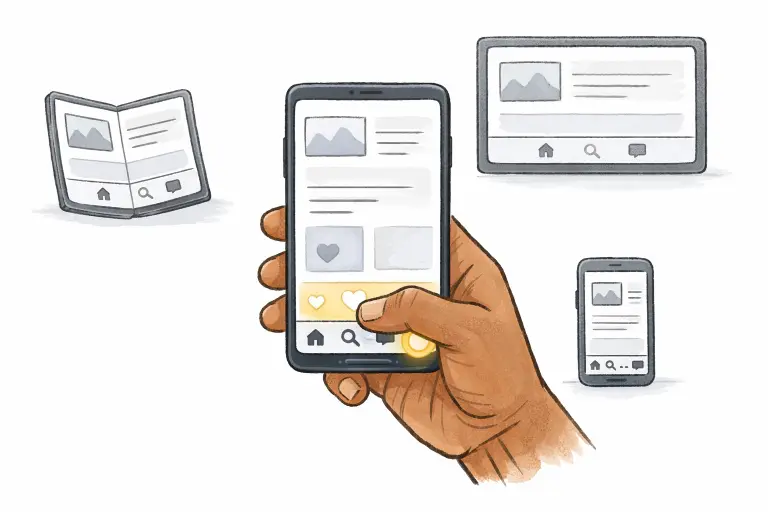
Furthermore, a thumb-friendly design not only aids accessibility for users with smaller hands or physical limitations but also makes apps feel more natural and immediate to use. As the mobile ecosystem expands to include devices like foldables and rollables, thumb-first interactions are increasingly important. Designers are increasingly using advanced analytics to analyze gesture patterns and optimize layouts not just for reach but also for comfort and efficiency. Ultimately, thumb-friendly navigation drives higher engagement, reduces cognitive load, and boosts user satisfaction, key metrics in the competitive mobile landscape.
Privacy-Focused Design Elements
With consumers becoming more vigilant about digital privacy, incorporating privacy-centric elements has become non-negotiable. Manufacturers like Samsung are leading with innovations such as built-in privacy screens that obscure sensitive content when activated. Features that allow users to mask notifications or app data from bystanders quickly are becoming increasingly popular. Privacy dashboards and clearer consent flows are becoming staples, letting users see and control what data is collected, how it’s used, and when it is shared. These efforts reflect a shifting regulatory and consumer landscape, emphasizing transparency and respecting user data by design.
Beyond hardware innovations, software UI design can enhance privacy through granular permissions, on-device processing options, and contextual prompts that educate users about their choices. Micro-interactions can visually reassure users that their data is protected, such as subtle lock icons or “private mode” indicators. Going forward, expect a growing focus on trust-building design, where transparency is not only a legal obligation but also a crucial part of brand reputation and user retention in the mobile marketplace.
Material 3 Expressive: Personalization and Fluidity
Google’s introduction of the Material 3 Expressive design language represents one of the most significant changes to the look and feel of Android mobile apps. Material 3 brings advanced customization through dynamic color theming, fluid animations, and greater emphasis on visual hierarchy. Users can now personalize their interfaces, allowing for a distinctive, branded user journey that reflects individual preferences. Thoughtful motion design further aids navigation and brings interfaces to life, making apps more delightful and less cognitively taxing to use.
Material 3 Expressive goes beyond colors and shapes, offering adaptive typography options in future sets and interactive transitions that further enhance user engagement. By embracing personalization, developers can foster emotional connections with users, leading to higher retention rates and positive reviews. Animations are no longer just decorative; they provide contextual feedback, assist in task completion, and make the overall experience smoother and more approachable for everyone, including novice users.
Edge-to-Edge Design Implementation
Modern interfaces are characterized by minimalistic and immersive layouts. With Chrome 135 introducing edge-to-edge design for Android, content can now extend seamlessly to the device’s physical boundaries. This approach eliminates unnecessary borders, draws attention directly to content, and presents a sleek, modern aesthetic. Such expansive layouts keep distractions at bay while fully leveraging new, larger, and higher-resolution displays.
Developers are now also reconsidering the use of shadows, gradients, and layering to create depth and direct user focus within these edge-to-edge spaces. This strategic use of digital real estate creates a more immersive, engaging experience, reducing visual clutter and allowing important content to stand out. As foldable and rollable screens evolve, these principles of edge-to-edge design will play a crucial role in reshaping users’ expectations. Minimalistic and immersive layouts characterize modern interfaces; as interface norms evolve, long-standing conventions are up for review. The hamburger menu, for instance, is increasingly being replaced by visible navigation bars, priority-plus menus, or tab-based solutions to improve discoverability and engagement. Designers experiment with new paradigms that keep primary actions in direct view, leading to more transparent, effortless navigation. Evaluating the relevance of legacy UI elements is crucial as the context in which apps are used continues to diversify.
Rethinking old patterns also means reassessing user flows, simplifying onboarding experiences, and introducing progressive disclosure so novice users are never overwhelmed. Testing is now more iterative than ever, with rapid A/B testing and user feedback loops central to the evolution of mobile design. A willingness to adapt and retire outdated UI conventions, in favor of more user-centric solutions, marks the difference between stagnant applications and those that stay ahead of the curve.
Conclusion
Keeping up with the latest mobile app design patterns is the key to creating intuitive, secure, and enjoyable user experiences in 2026. By embracing adaptive and responsive designs, prioritizing thumb-friendly navigation, providing robust privacy controls, leveraging the advancements of Material 3 Expressive, and regularly rethinking traditional UI patterns, designers can develop products that not only meet but exceed user expectations in a crowded market. This combination of functional innovation and user-focused design will define the leading mobile apps in the years ahead.
Ultimately, the future of mobile app UI design is not static; it is dynamic, powered by continual learning and adaptation. As device hardware advances and user demands grow, those who invest in understanding and implementing current trends will be best positioned to delight users and achieve sustained success. Staying proactive ensures your apps remain competitive, relevant, and above all, a pleasure to use in the increasingly complex digital world.