
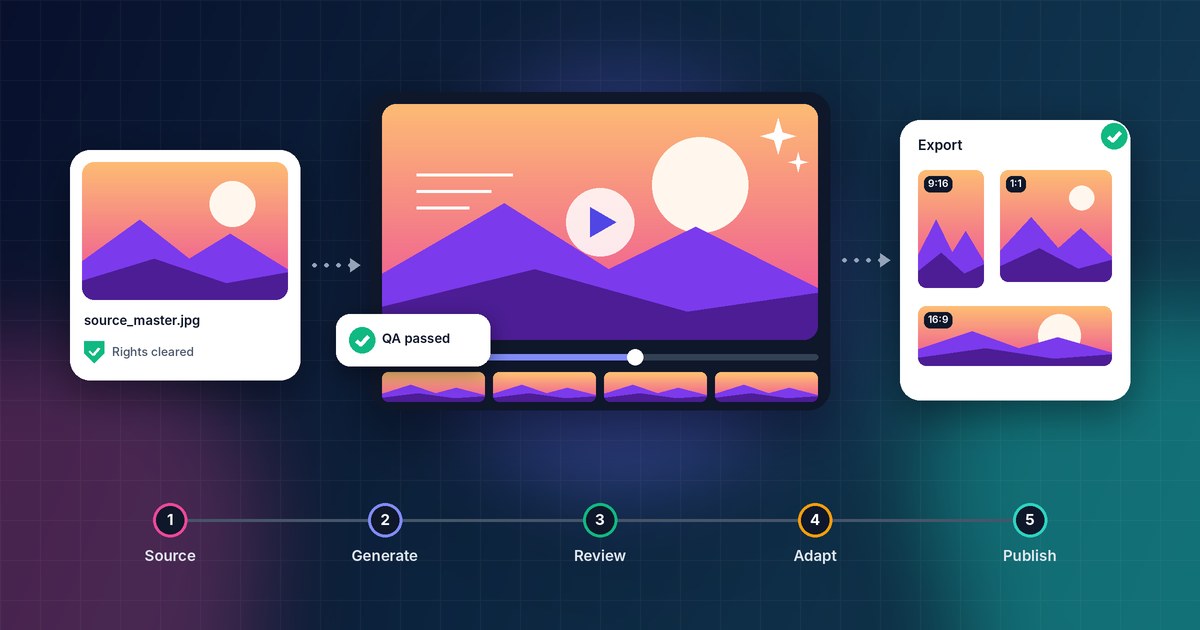
AI video production becomes difficult when teams collect tools without defining how assets, prompts, approvals, and exports move through the system. A sustainable stack is not the one with the most models. It is the one that makes each decision traceable from the original source to the published clip.
Layer 1: Source Assets and Rights
Every project should begin with an approved source library. Store the original image or video, creator information, usage rights, consent records, and brand restrictions together. Use clear filenames and avoid downloading the same asset into several disconnected folders. Rights metadata is part of the production asset, not an administrative task to complete later.
Check technical quality before generation. A distinct subject, sufficient resolution, consistent lighting, and a relatively simple background improve the chance of stable output. Preserve an untouched master file so every experiment can be compared with the same source.
Layer 2: Controlled Generation
For still images, an image-to-video creation tool can add motion from a written prompt. Effective prompts describe the subject action, camera movement, speed, atmosphere, and constraints. A product prompt might request a slow camera slide while preserving package geometry and label position. A portrait prompt might request gentle expression and minimal head movement while keeping facial identity stable.
Generate a small number of purposeful variants. Change one variable at a time, such as motion strength or camera direction. If every version changes several factors, the team cannot tell which instruction improved the result. Save prompts beside outputs so successful patterns remain reproducible.
Layer 3: Visual and Factual Quality Assurance
Review at normal speed, slow speed, and selected frames. Look for flicker, geometry changes, identity drift, disappearing objects, unstable hands, and background artifacts. Then review factual elements: logos, product features, captions, dates, prices, and claims. A smooth clip can still be inaccurate.
Use a two-person review for customer-facing content when possible. One reviewer checks visual continuity, while another checks brand and factual accuracy. Record the reason for rejection rather than simply deleting a failed version. A small error library can improve future prompts and source selection.
Layer 4: Transformation and Adaptation
Some campaigns need more than image animation. Teams may adapt a presenter, replace a character, transfer a performance to an illustration, or standardize the visual style of existing footage. An AI video swap toolkit supports face swap, character replacement, motion control, and style transfer workflows. These transformations need explicit permission and a closer review of faces, bodies, lighting, occlusion, and timing.
Keep localized or alternate-cast versions connected to the approved master. Record what changed and what remained constant. This prevents teams from publishing a transformed clip whose claims, product appearance, or performance context no longer match the original campaign.
Layer 5: Editing, Distribution, and Learning
Add captions, verified text, branding, and audio in a controlled editing stage. Export for the intended channel rather than relying on one universal file. Vertical, square, and landscape formats have different framing needs, and captions must remain inside safe areas.
Finally, track both content performance and production performance. Watch time and completion rate reveal audience response, while generation time, rejection rate, and repair time reveal whether the workflow is efficient. A video that performs well but requires excessive manual correction may not be a scalable pattern.
Final Thoughts
The best AI video stack joins creative speed with operational discipline. It protects source rights, limits variables during testing, applies visible quality checks, and retains a record of each approved decision. That structure allows a team to adopt new models without rebuilding the entire production process every time the technology changes.
For a broader introduction to how these tools work and how to use them responsibly, see our practical guide to artificial intelligence.