AI video is starting to move beyond quick experiments. For many creators, the bigger question is whether a tool can help turn a rough idea into a usable first draft.
Most people who have tried AI video know the pattern. The first result can be exciting, but it often needs more control before it feels useful. A product may look close but not exact. A scene may have the right mood but the wrong timing. A clip may be visually interesting, yet still hard to fit into a real campaign, tutorial, or social post.
That is why Seedance 2.5 is attracting attention. Its value may not come from one dramatic demo, but from how it fits into everyday creative work: planning scenes, using references, testing motion, reviewing drafts, and improving the result before publishing.
Why Everyday Creative Workflows Are Changing
Most creators do not need technology that looks impressive for a few seconds and then becomes hard to control. They need tools that fit into the way work actually happens: a rough idea, a reference image, a short script, a draft, feedback, and another revision.
That is why AI video is entering a more practical phase. Early tools were exciting because they could turn text into motion. Now creators want outputs they can actually use for product videos, social clips, tutorials, explainers, pitch visuals, and internal campaign drafts.
The growing attention around Seedance 2.5 comes from this shift. Instead of treating AI video as a novelty, many creators are now asking how it could help them move faster from concept to usable visual draft.
From One Prompt to a Creative Brief
A prompt is useful, but it is rarely enough on its own. In real work, a creator often has a subject, tone, camera direction, reference images, pacing, audio style, and a clear idea of what the viewer should understand by the end.
That matters because video is not just an image with movement. It has timing, continuity, transitions, and a sense of direction. When a tool understands more of the creator’s context, the result has a better chance of matching the original idea.
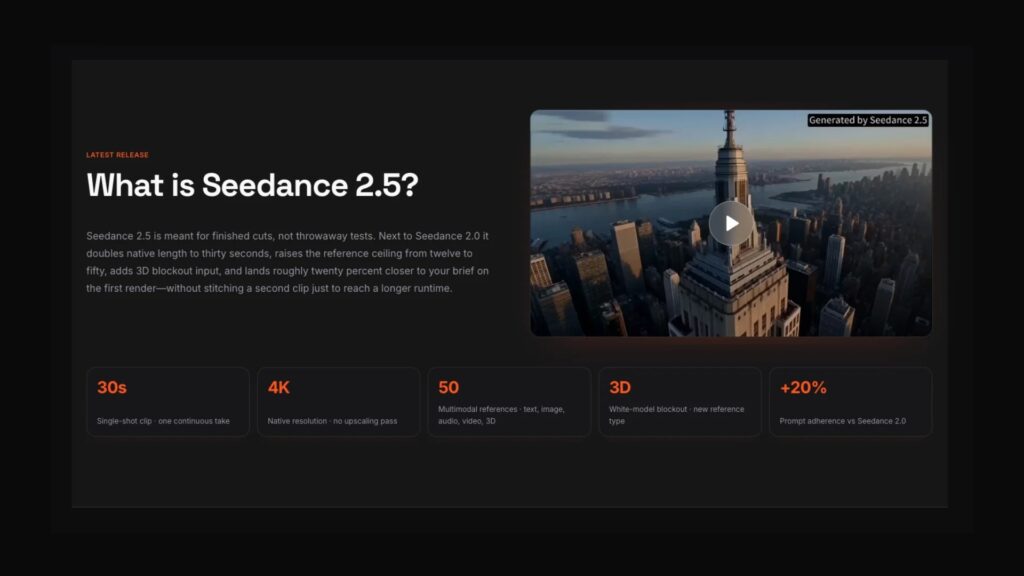
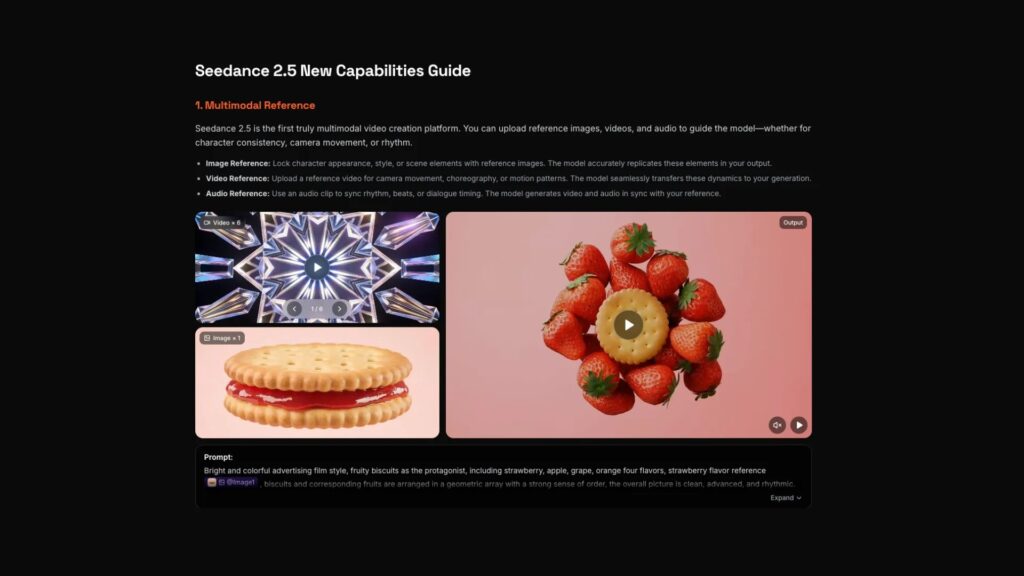
Seedance 2.5 is being watched because its workflow is built around richer inputs: text, image, audio, video, and reference materials. For everyday creators, that means the work can start from real assets rather than from a vague sentence alone.
Why Longer Video Matters
Short AI clips are good for experiments, but many content ideas need more room. A product teaser may need to show the item, demonstrate motion, and finish with a clear final frame. A creator video may need a setup, a visual change, and a closing beat. A short tutorial may need to show steps in order.
When every few seconds have to be generated separately, continuity can break down. The lighting changes, the subject moves differently, or the pacing starts to feel uneven. The final edit can become a patchwork of clips that almost match but not quite.
Longer AI video generation could make a difference by giving creators more space to build a complete idea in one draft. The value is not only length. The real value is whether the clip can hold the idea together long enough to be useful.
References Make the Workflow More Practical
Reference assets are important because they reduce guesswork. A product image can define the subject. A style frame can show the mood. A short video can suggest the motion. Audio can guide rhythm. The prompt explains how those pieces should work together.
This is where Seedance 2.5 creative video AI may become useful for daily content work. Instead of asking the model to invent everything, creators can guide the output with materials they already use in planning, marketing, design, or storytelling.
That workflow is especially helpful for teams. A marketer can share reference materials with a designer. A creator can show a client the direction before filming. A small business can test a product concept before spending money on a full production.
Where Creators Could Use It
Social media drafts
Creators can test different visual ideas before deciding what to publish. A quick AI draft can help compare pacing, framing, and visual style.
Product and brand videos
Small teams can turn product shots, moodboards, or campaign notes into early video concepts. That can make planning faster before a professional shoot or final edit.
Explainers and tutorials
Educational creators and software teams can use video drafts to show a process, demonstrate a feature, or outline a lesson before polishing the final version.
Client previews
Agencies and freelancers can use AI video as a discussion tool. A draft does not need to be final to be useful; it can help everyone agree on the direction earlier.
A Simple Workflow to Try
For creators who want better results, the process should stay simple and organized.
- Start with one clear goal for the clip.
- Collect the most important references before writing the prompt.
- Describe the sequence, not only the look.
- Review the draft for continuity, timing, and message clarity.
- Use the result as a draft, not as an automatic final version.
This keeps the creator in control. AI video can speed up the first draft, but the strongest results still come from clear direction and careful review.
The Human Part Still Matters
AI video can make creative work faster, but it does not remove taste, planning, or judgment. A clip may look polished and still miss the point. A camera move may look cinematic but distract from the message. A product may appear in motion but still not match the brand style.
That is why human review is still essential. Creators need to check whether the video supports the goal, whether the references stayed consistent, and whether the final result is accurate enough to publish or share.
Final Thoughts
Seedance 2.5 is worth watching because it reflects where AI video is heading: longer clips, more references, clearer prompts, and more practical creative workflows. For everyday creators, the important change is not simply that videos may look better. It is that the process may become easier to direct.
If AI video can help creators move from idea to first draft faster while keeping more control over the result, it could become a regular part of content planning, not just a tool people try once for fun.